
What is Lens Options Preview?
Lens Options Preview is a module embedded in an integrator-owned purchase funnel. It helps Shoppers understand selected lens options through visual demonstrations.
The integrator owns the funnel, catalogue, pricing, frame eligibility and final lens choice. Lens Options Preview owns the visual demonstrations, the Display Embed, and Rendered Visual generation.
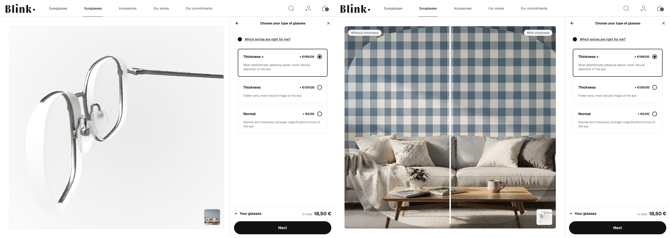
How the feature works
- The integrator creates one module instance for the selected, eligible frame.
- When the module is ready, the integrator can optionally provide a prescription context.
- The integrator asks the module to display a lens option.
- The Shopper sees the option in the Display Embed.
- When needed, the integrator requests a static Rendered Visual for cards, thumbnails or tooltips.
Lens options
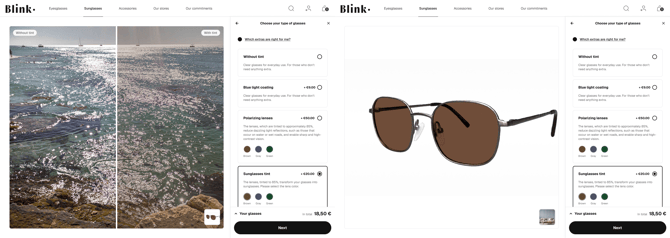
| Option | What the Shopper sees | Key behaviour |
|---|---|---|
| Thickness | An interactive Viewer or a See-through comparison. | V1 supports unifocal lenses. See-through compares the baseline on the left with the candidate on the right. |
| Coating | A See-through comparison. | The untreated lens is on the left and the selected coating is on the right. Coatings do not depend on prescription and are shown one at a time. |
| Tint | See-through; animated See-through for photochromic tints. | A tint is selected by its tint SKU. Polarising tint uses fixed post-processing; other supported tints use 3D rendering. |
The standard large Viewer is interactive: the Shopper can rotate it by click-and-drag. Thumbnails, tooltip visuals and generated visuals are static.
Prescription context
Prescription is optional. It personalizes the demonstration when supplied.
Without prescription, the module uses its default context:
- SPH, CYL and ADD are
0. - PD is
64.
Display Embed and Rendered Visual
The Display Embed is the live visual inserted into the host page.
- It supports containers from 1:1 to 16:9, with a minimum height of 120 px.
- See-through uses a fixed 50:50 split.
- The Display Embed and Rendered Visual are independent rendering flows.
A Rendered Visual is a static opaque JPEG Blob that the integrator can place in its own interface. It can be requested without creating or hiding a Display Embed. The integrator supplies its width and height; they must use a 1:1–16:9 ratio and a maximum height of 1080 px.