
What is the Native Frame Carousel
The Frame Carousel that allows users to browse recommended frames and switch between different variants of a frame without leaving the Virtual Try-On (VTO) experience.
The carousel's native component is rendered and managed by the VTO. No custom front-end development is required to display it.
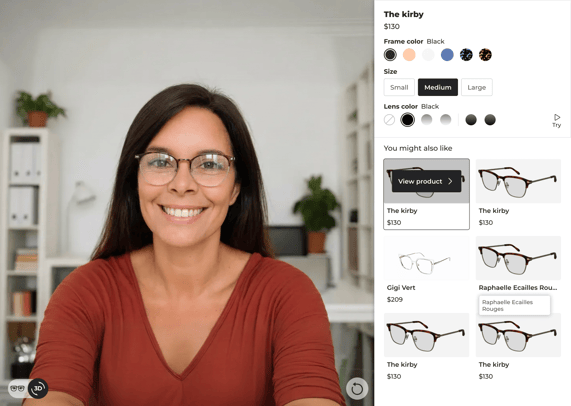
Use cases
The Native Frame Carousel interface is configurable according to your needs. You can choose which sections to display or hide.
Frame variants
The carousel can also be used to display variants of the same frame. Variants allow users to switch between different options while staying on the same model.
Supported variant types are:
-
Frame color
-
Frame size
-
Lens color
Each variant updates the try-on rendering accordingly. There is no limitation to the number of frame color and lens color variants displayed.
Recommended frames
The Frame Carousel can display a list of recommended frames inside the vritual try-on interface. These frames are presented as a list and allow users to quickly try alternative models.
Typical use cases include:
-
Highlighting bestsellers
-
Showing similar or alternative frames
-
Promoting a specific collection or brand
Preconditions
To use the Frame Carousel, the following conditions must be met:
-
The VTO is already integrated and functional on the website
High-level behavior
What is displayed
Depending on the configuration, the carousel can display:
-
A recommended frame section
-
One or more variant selectors for the active frame
Only items with all required fields correctly provided are displayed.
Where it appears
The Frame Carousel appears inside the VTO interface, as part of the native selector area. Its exact position is managed by the VTO and adapts to the device and screen size.
Interaction with the VTO
User interactions with the carousel directly update the virtual try-on:
-
Selecting a recommended frame loads it in the try-on
-
Selecting a variant updates the current frame rendering
All interactions happen without page reloads.
Both Live mode and 3D Viewer mode are compatible with the Frame Carousel.
Limitations
-
A maximum of 6 recommended frames can be displayed at the same time (but there is no limitation to the number of frame color and lens color variants)
-
Frames or variants with missing required data are not displayed